How to Find Your Lost Nothing Ear (2) in Minutes
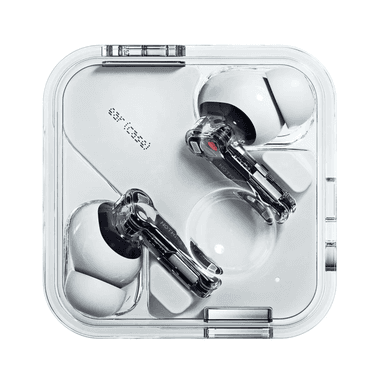
The Nothing Ear (2) feature the brand's signature transparent design with visible circuit boards, making the case visually distinctive — but the clear plastic also makes the case harder to spot against light-colored surfaces like white desks or marble countertops. They support LHDC 5.0 hi-res codec, a feature unique to Nothing in this price range, though it has no bearing on findability. EarBuddy detects their BLE 5.3 signal at 30 feet, and because Nothing provides absolutely zero tracking features — no last location, no ring, no map — EarBuddy is genuinely the only tool available to locate these earbuds once they go missing.
Ear (2) Bluetooth Specs
Bluetooth Version
BLE 5.3
Detection Range
30 feet indoors
Battery Life
6.3 hours (36 with case)
Weight
4.5g per earbud
Water Resistance
IP54
Audio Codecs
LHDC 5.0, AAC, SBC
Case Battery
36 hours
Price
$149
Release Year
2023
Why Your Phone Can't Find Your Ear (2)
Nothing's app has no find or locate feature whatsoever. There is no way to ring, track, or see last known location for Nothing Ear (2) through official channels.
Step-by-Step: Find Your Nothing Ear (2) With EarBuddy
Your Ear (2) uses BLE 5.3, broadcasting at 2.4 GHz with a typical range of 30 feet indoors. With up to 6.3 hours (36 with case) of battery life, there's a good chance it's still transmitting. Here's how to track it down:
Open EarBuddy and tap Start Scanning.
Nothing Ear (2) broadcast a BLE signal detectable by EarBuddy.
Walk around the area where you last had them.
Follow the signal strength — it increases as you get closer.
The transparent case is distinctive — look for it once you're close.
Ready to Find Your Ear (2)?
Download EarBuddy and start scanning in seconds. The Bluetooth radar works with all BLE devices — no pairing required.
Download EarBuddy to Find Your NothingFrequently Asked Questions
Does Nothing have a find my earbuds feature?
Can the transparent Nothing case help me find them?
Find Other Devices
Nothing
Ear (a)
Lost your $99 Nothing Ear (a)? Nothing has no find feature. Use EarBuddy's Bluetooth scanner to detect the signal and find them quickly.

Apple
AirPods 4
Lost your Apple AirPods 4? Use EarBuddy's Bluetooth scanner to detect the BLE signal and track them down — even when Find My can't help.

Apple
AirPods 3rd Generation
Lost your AirPods 3? EarBuddy's Bluetooth radar detects the BLE signal from your AirPods 3rd Generation even when they're disconnected from your iPhone.
Apple
AirPods Pro 2
Lost your $249 AirPods Pro 2? Use EarBuddy to scan for their Bluetooth signal in real-time — works even without Precision Finding or U1 chip.