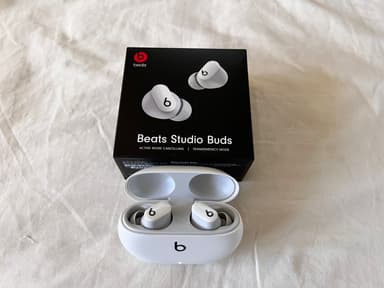
How to Find Your Lost Beats Studio Buds+ in Minutes
The Studio Buds+ are the only Beats earbuds that work with both Apple Find My and Google Find My Device, making them uniquely cross-platform — yet neither platform offers real-time proximity guidance, only a map pin of the last connection. Their signature transparent case is eye-catching but also picks up lint and scratches that can obscure the earbuds inside, making visual identification harder over time. With BLE 5.3 and a generous 36-hour total case battery, EarBuddy has a long detection window and a strong signal to work with, typically picking them up at 30 feet indoors.
Studio Buds+ Bluetooth Specs
Bluetooth Version
BLE 5.3
Detection Range
30 feet indoors
Battery Life
9 hours (36 with case)
Weight
5.0g per earbud
Water Resistance
IPX4
Audio Codecs
AAC, SBC
Case Battery
36 hours
Price
$169
Release Year
2023
Why Find My Can't Find Your Studio Buds+
Studio Buds+ support both Find My (iOS) and Find My Device (Android), but both only show last known location. Neither provides real-time scanning guidance.
Step-by-Step: Find Your Beats Studio Buds+ With EarBuddy
Your Studio Buds+ uses BLE 5.3, broadcasting at 2.4 GHz with a typical range of 30 feet indoors. With up to 9 hours (36 with case) of battery life, there's a good chance it's still transmitting. Here's how to track it down:
Open EarBuddy and begin scanning.
Studio Buds+ broadcast BLE signals on both iOS and Android.
Walk through the area where they were last seen.
Use the signal meter to narrow down the location.
Their transparent case is distinctive — look for it once you're in the right area.
Ready to Find Your Studio Buds+?
Download EarBuddy and start scanning in seconds. The Bluetooth radar works with all BLE devices — no pairing required.
Download EarBuddy to Find Your BeatsFrequently Asked Questions
Do Beats Studio Buds+ work with both Find My and Find My Device?
Can I find the transparent Beats Studio Buds+ case?
Find Other Devices
Beats
Fit Pro
Lost your Beats Fit Pro? Find My only shows last location. EarBuddy gives you real-time Bluetooth scanning to physically track them down.
Beats
Solo Buds
Lost your Beats Solo Buds? Their case doesn't charge them, so time is limited. Use EarBuddy to scan for the Bluetooth signal quickly before battery dies.

Apple
AirPods 4
Lost your Apple AirPods 4? Use EarBuddy's Bluetooth scanner to detect the BLE signal and track them down — even when Find My can't help.

Apple
AirPods 3rd Generation
Lost your AirPods 3? EarBuddy's Bluetooth radar detects the BLE signal from your AirPods 3rd Generation even when they're disconnected from your iPhone.