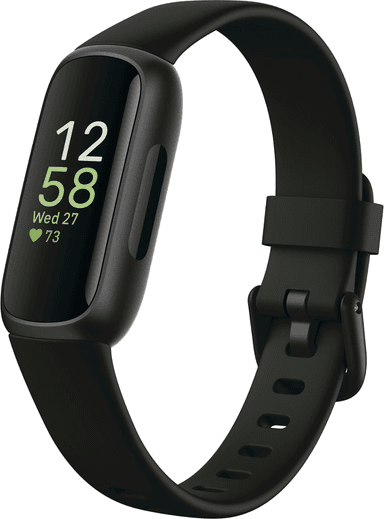
How to Find Your Lost Fitbit Inspire 3 in Minutes
At just 20 grams without the band, the Fitbit Inspire 3 is one of the lightest wearables on the market, which means users genuinely forget it's on their wrist — and conversely, don't notice when it falls off. Its clip-on accessory option means it can detach from clothing and drop into laundry baskets, couch crevices, or onto floors without any sensation of loss. The 10-day battery provides one of the longest BLE broadcast windows of any Fitbit, and EarBuddy can detect its BLE 5.0 signal at 28–30 feet, making it the only practical search tool for this nearly invisible tracker.
Inspire 3 Bluetooth Specs
Bluetooth Version
BLE 5.0
Detection Range
30 feet indoors
Battery Life
10 days
Weight
20g (without band)
Water Resistance
WR50 (50 meters)
Price
$99
Release Year
2022
Why Fitbit App Can't Find Your Inspire 3
Fitbit Inspire 3 is a slim, lightweight tracker that's easy to misplace. The Fitbit app has zero locate functionality — it only shows last sync time.
Step-by-Step: Find Your Fitbit Inspire 3 With EarBuddy
Your Inspire 3 uses BLE 5.0, broadcasting at 2.4 GHz with a typical range of 30 feet indoors. With up to 10 days of battery life, there's a good chance it's still transmitting. Here's how to track it down:
Open EarBuddy and begin scanning.
Fitbit Inspire 3 emits a standard BLE signal.
Search around your bedroom, bathroom, and laundry area.
Follow the signal strength as you search.
It's very slim — check inside pockets, between cushions, and in drawers.
Ready to Find Your Inspire 3?
Download EarBuddy and start scanning in seconds. The Bluetooth radar works with all BLE devices — no pairing required.
Download EarBuddy to Find Your FitbitFrequently Asked Questions
Can I find Fitbit Inspire 3 with my iPhone?
How long does the Fitbit Inspire 3 battery last?
Find Other Devices
Fitbit
Charge 6
Lost your Fitbit Charge 6? The Fitbit app can't locate it. Use EarBuddy's Bluetooth scanner to detect the BLE signal and find it fast.

Fitbit
Versa 4
Lost your Fitbit Versa 4? Fitbit has no find feature. Use EarBuddy's real-time Bluetooth scanner to track the signal and locate your watch.
Fitbit
Sense 2
Lost your $299 Fitbit Sense 2? No find feature in the Fitbit app. Use EarBuddy to detect the Bluetooth signal and locate your watch.
Apple
Apple Watch Series 11
Lost your $399 Apple Watch Series 11? EarBuddy detects its Bluetooth signal even when Find My can't connect. Track it down with real-time BLE scanning.